Choose Wearton if you want to see how well each piece suits your colors, use your closet on your computer as well as your phone, and try clothes from any shop on your own photo. Choose Acloset if you want phone apps you can install today, a fit diagnosis of your body shape, packing lists for your trips and a big community.
We make Wearton, so we are not neutral. Below we compare the two apps feature by feature, and we say where Acloset is better too.
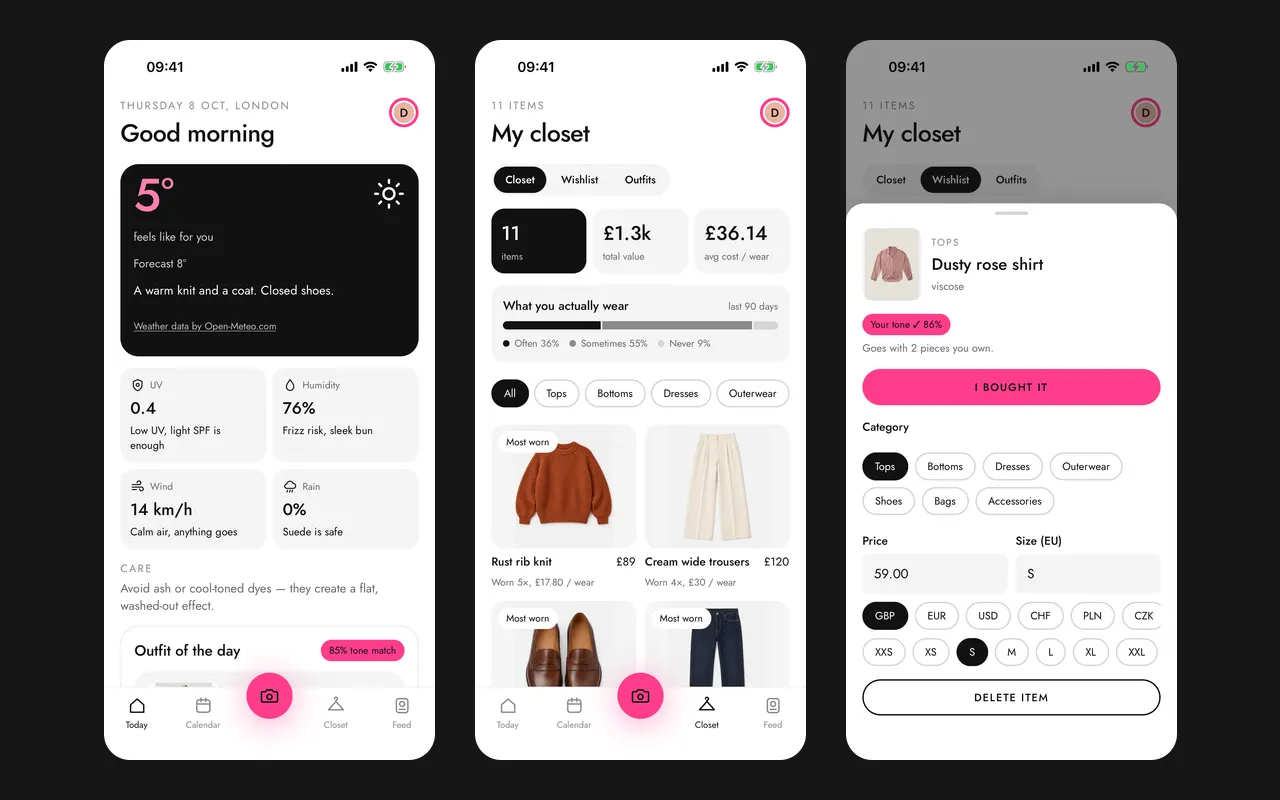
Wearton vs Acloset at a glance
| Wearton | Acloset | |
|---|---|---|
| Getting dressed | ||
| Color analysis | Season, undertone and palette from a selfie (phone app, coming soon); pick your season by hand now | Its AI stylist analyzes your best colors (“personal color”) |
| Color match on every piece | Yes, in the closet and on the wishlist | Not on its store pages |
| Body shape | You pick your body type, and the stylist uses it | A fit diagnosis finds your most flattering silhouettes |
| Outfit for today’s weather | Picked from your own clothes for the feels-like temperature, wind and rain | Daily outfit ideas for the weather and your schedule |
| Learns if you run warm or cold | Yes | Not on its store pages |
| AI stylist you can chat with | Hooky, in your language, with the credits of your plan | Yes. Each chat uses Beans, a coin you buy (100 for $1.99) |
| Virtual try-on | On your own photo, in the web app and the browser extension | On an AI avatar made from your photo, in the phone app |
| Organizing | ||
| Digital closet | Yes, with background removal | Yes, with photo clean-up, online search, and every piece found in one mirror selfie |
| Cost per wear | Yes | Yes, with purchase dates and your most-loved pieces |
| Outfit calendar | Plans outfits for your calendar events (phone app, coming soon) | Yes: plan outfits ahead and log what you wear |
| Packing for trips | No | Yes, with real weather data |
| Community | No | Yes: style leaders’ closets, and outfits planned with friends |
| Shopping | ||
| Wishlist | Shows color match, what it goes with, and similar pieces you own | Yes, in the app and the Chrome extension |
| Add from shops | One click on the shop page with the browser extension; links, screenshots, order emails and price tags in the phone app (coming soon) | The Chrome extension, online search, and imports from shops such as Amazon, Zara and Shein |
| Platforms and price | ||
| iPhone and Android | Coming soon | Yes, and iPad and Mac with Apple silicon |
| Web app | Yes | No. The Chrome extension shows your closet and wishlist |
| Sign up on a computer | Yes | No, only in the phone app |
| Browser extensions | Chrome, Edge, Firefox | Chrome |
| Languages | 15 | 18 |
| Ads | No | Yes |
| Price | Paid plan in the phone app | Free up to 100 pieces; plans from $3.99 to $24.99 a month; Beans for AI features |
Acloset facts come from its App Store page, its Google Play page, its Chrome Web Store page and the acloset.app FAQ, read on October 21, 2026. The item limits of its plans and what Beans pay for come from the app’s own screens, seen on October 11, 2026.
Where Wearton is better
Every piece shows how well it suits you. Acloset’s store pages say its AI stylist analyzes your best colors. They do not say that your closet shows them. Wearton knows your color season (one of 12), your undertone and your palette of about eight colors, like the Soft Autumn palette. Every piece in your closet and on your wishlist then shows how well it matches that palette, so you know before you wear a piece or buy it. In the phone app (coming soon), one selfie finds your season. On the web, you can pick your season by hand today.
It works on your computer, not only your phone. To use Acloset, you sign up in its phone app. On a computer, you have its Chrome extension. Wearton is a web app: sign up in your browser, and use your closet, Today, try-on and Hooky there. Its extension works in Chrome, Edge and Firefox.
Try on clothes from any shop, on your own photo. In Acloset’s phone app, you dress an AI avatar made from your photo. With the Wearton extension, you drag a picture from a shop page onto your own photo, or right-click it and choose “Try this on me”. The result shows the piece on you, not on an avatar. The wishlist then shows how well the piece suits your colors, how many of your clothes it goes with, and whether you already own something similar.
Its stylist needs no coins. In Acloset, each chat with the AI stylist uses Beans, a coin you buy in packs (100 for $1.99). Hooky, Wearton’s AI stylist, uses the monthly credits of your plan. Ask what to wear to a dinner, plan your week, or ask if a piece is worth buying. Hooky works from your closet, your colors, your body type if you add it, and today’s weather.
It dresses you for how the weather feels. Acloset suggests outfits for the weather too. Wearton uses the feels-like temperature, not just the number on the thermometer. Wind matters: in a 12 mph (20 km/h) wind, 60 degree weather (15.6 °C) can feel like 51 °F (10.6 °C). Tell Wearton how yesterday felt, and it learns whether you run warm or cold.
No ads. Acloset’s App Store and Google Play pages say that the app contains ads. Its App Store privacy label lists contact info, identifiers and usage data that “may be used to track you across apps and websites owned by other companies”. Wearton shows no ads, and you can turn off usage data in your profile.
Where Acloset is better
- Phone apps you can install today, for iPhone, iPad, Mac with Apple silicon and Android. They are rated 4.5 from about 5,400 ratings on the US App Store and 4.5 from about 31,000 reviews on Google Play, with over 5 million installs and an Editors’ Choice badge. Wearton’s phone apps are coming soon.
- A fit diagnosis. Acloset finds the silhouettes that flatter your body shape. In Wearton, you pick your body type yourself.
- Faster ways to add clothes. Find every piece in one mirror selfie, turn a quick snap into a clean product photo, or search online for a piece you own.
- Packing for trips, with real weather data.
- A big community. Browse the closets of style leaders and plan outfits with friends. Acloset says it has 4 million users.
- More try-ons on paid plans. Each paid plan includes free try-ons every day.
- More languages: 18, among them Arabic, Korean and Vietnamese. Wearton has 15.
How to move from Acloset to Wearton
- Join Wearton with your email below, and open the Wearton web app.
- Add the pieces you wear most first. Take a photo of each, or open its product page in your browser and add it with the Wearton extension.
- Pick your color season in your profile. The selfie test comes with the phone app.
- Open the Today page in the morning. Wearton picks an outfit from the clothes you have added, and gets better as your closet grows.
Can I move my closet from Acloset to Wearton?
Yes, piece by piece. Acloset’s FAQ does not describe an export that Wearton can read, so you add your clothes again: by photo, or from each piece’s shop page with the Wearton browser extension.
Does Acloset have color analysis?
Yes. Its store pages say the AI stylist gives “a personalized analysis of your best colors (personal color)”. They do not say how it works, or whether your closet shows which pieces suit you. Wearton finds your season, undertone and palette, and shows the color match of every piece in your closet and on your wishlist. On the web, you can pick your season now; the selfie test comes with the phone app.
Does Acloset have virtual try-on?
Yes. In its phone app, you dress an AI avatar made from your photo, and you need an account to use it. Wearton shows a piece on your own photo, in the web app and the browser extension, with any picture from a shop page.
Does Acloset plan outfits for the weather?
Yes. Its store pages say you “receive daily outfit suggestions tailored to the weather and your schedule”. Wearton picks an outfit of the day for the feels-like temperature, wind and rain, and learns from your answers whether you run warm or cold.
Is Acloset free?
Up to 100 pieces. For more, you need a plan: Basic for up to 300 pieces ($3.99 a month or $27.99 a year), Premium for up to 1,000 ($9.99 or $59.99) or Expert with no limit ($24.99 or $147.99), on the US App Store. The AI stylist chat, the photo clean-up and finding pieces in a photo use Beans, from $1.99 for 100. The Wearton phone app has a paid plan.
Can I use Wearton on my computer?
Yes. Wearton works in your browser, as a web app and as an extension for Chrome, Edge and Firefox, and you can sign up there. To see what to wear in your city right now, try the What to wear today tool. It needs no sign-up.